Advertisement
Human Motion Explorer

Report an Issue

Let us know what's wrong with this game

Human Motion Explorer

Developer: Desert Core Dev
Updated: 2026-07-30
Simulation Education Anatomy

Reviews

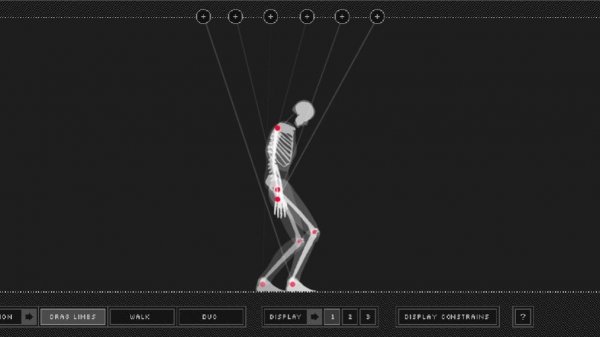
Human Motion Explorer excels at turning abstract biomechanics into a tangible, interactive experience. The direct manipulation interface is remarkably intuitive, allowing users to pose a digital figure and instantly see the effects of each joint adjustment. The side-by-side comparison feature is particularly effective for teaching how individual joints contribute to overall movement. The self-paced, pressure-free environment makes it an excellent tool for both classroom settings and independent exploration. It is a refreshing, educational alternative to passive learning methods.

About this game

Direct Manipulation Interface

Instead of reading static diagrams, this simulation places a digital human figure at your fingertips. Each joint responds to simple clicks or taps, allowing you to bend knees, rotate shoulders, or tilt the pelvis. Every adjustment instantly updates the figure's posture, making abstract concepts like balance and range of motion visible and intuitive.

Learning Through Experimentation

The core experience encourages trial and error. Small changes to a single joint produce immediate visual feedback, revealing how the body maintains stability during standing or walking. This hands-on approach transforms complex biomechanical principles into accessible, memorable lessons. Users can test their own theories about movement without any pressure.

Side-by-Side Comparisons

A second figure can be added to the workspace, enabling direct comparisons. Set different joint configurations and observe how each figure holds its posture or shifts its weight. This feature clarifies how individual joints contribute to coordinated motion, making it easier to understand concepts like gait variation or the effects of limited flexibility.

Accessible Design for All Ages

The interface avoids cluttered menus. Controls are limited to selecting and dragging joint points, which suits both young learners and adults. The simulation works on standard devices with mouse or touch input, removing barriers for classroom or home use. No prior knowledge of anatomy is required.

Self-Paced Discovery

No timers or scores push the user forward. The environment supports open-ended exploration, allowing learners to spend as much time as needed on each concept. This structure is ideal for building a solid understanding of human movement mechanics without pressure.


Compatibility

• OS: Windows 10+, macOS 11+, iOS 14+, Android 10+
• Browsers: Chrome 100+, Safari 15+, Edge 100+, Firefox 100+
• Not compatible with Internet Explorer
Tested on real devices ✅ works as expected

Faq

What age group is Human Motion Explorer designed for?
The simulation is suitable for children aged 8 and up, as well as adults. The direct manipulation interface requires only basic mouse or touch skills, making it accessible for middle school science classes, high school biology students, or anyone curious about how their body works.
Does Human Motion Explorer require any prior knowledge of anatomy?
No prior knowledge is needed. The simulation is designed to teach biomechanical concepts through hands-on experimentation. Users learn by doing, not by reading textbooks. The interface guides discovery naturally, so beginners can start exploring immediately.
Can I use Human Motion Explorer on a tablet or smartphone?
Yes. The simulation works on standard devices with mouse or touch input. It is optimized for both desktop and mobile browsers, allowing users to learn on the go. No app download is required for most platforms.
Is Human Motion Explorer a game or an educational tool?
It is an interactive simulation that blends education with puzzle-like exploration. While there are no scores or levels, the process of adjusting joints to achieve specific poses or understand movement patterns feels engaging and game-like. It is ideal for both formal learning and casual curiosity.
How does the side-by-side comparison feature work?
You can add a second figure to the workspace and independently adjust each figure's joints. This allows you to compare different postures, such as a straight leg versus a bent knee, and observe how each configuration affects balance and movement. It is a powerful tool for understanding individual joint roles.
Are there any hidden costs or in-app purchases in Human Motion Explorer?
The simulation is free to use with no hidden costs, in-app purchases, or advertisements. All features, including the side-by-side comparison and full joint manipulation, are available from the start. This ensures an uninterrupted learning experience.

Comments

0 comments
U
User
Loading comments...

Similiar Product

Number Grid Logic Solver

Puzzle Arithmetic Reasoning

PLAY NOW

Emoji Memory Match Quest

Puzzle Memory Arcade

PLAY NOW

3D Sphere Collection Puzzle

Puzzle Arcade Physics

PLAY NOW

Traffic Clash 2: Chain Reaction

Bubble Pop Chain Reaction Puzzle

PLAY NOW