
Seesawball Two Player Sports
Reviews
Seesawball Two Player Sports delivers a simple yet addictive competitive experience. The controls are intuitive, matches are quick, and the focus on local multiplayer makes it great for parties or family game nights. It is free and browser-based, so there is no barrier to playing. The game excels at what it sets out to do: provide pure, head-to-head fun.
About this game
Game Introduction
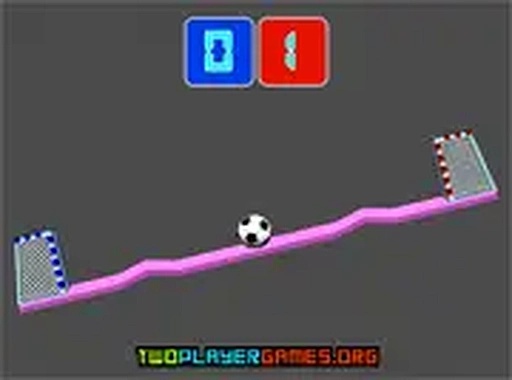
Seesawball Two Player Sports is a competitive sports game designed for two players sharing a single computer. It recreates the excitement of a classic finger wrestling match on screen, where each player controls one side of a seesaw-like platform. A ball starts in the center, and players tilt the platform to send the ball toward the opponent's goal. The first to score 11 goals wins the match. The game is free to play, runs in any modern browser, and requires no downloads or installations. Its simple design focuses on pure head-to-head competition, making it ideal for quick matches with friends or family members. The game is best enjoyed on a desktop computer with a keyboard.
How to Play
Two players sit at the same computer, each using their own keyboard keys to control the platform. Player 1 uses the W key to tilt the platform left and the S key to tilt it right. Player 2 uses the Up Arrow key to tilt left and the Down Arrow key to tilt right. The goal is to angle the platform so the ball rolls toward the opponent's goalpost. Each goal adds one point. The game ends when a player reaches 11 points. After each goal, the ball returns to the center for the next round. The game works only on desktop computers with a keyboard. For a better view, use full screen mode.
Game Features
Features include two-player local competition, simple keyboard controls for fast learning, and fast-paced matches that end quickly. The game is free to play with no registration required. It offers full screen mode for immersive play and is browser-based, so no installation is needed. Every round resets the ball to the middle, keeping the action continuous and engaging.
Tips for Success
Practice your timing and coordination to outplay your opponent. Since the ball resets to center after each goal, stay focused and anticipate your opponent's moves. Quick reactions and precise tilting are key to scoring. Play regularly to improve your control and learn to predict the ball's trajectory. Communication with your opponent can also make matches more enjoyable and competitive.








Comments
0 comments