
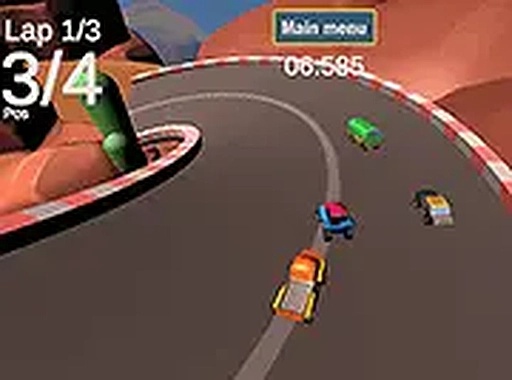
City Speed Racing
Reviews
City Speed Racing delivers a polished arcade racing experience with vibrant 3D city tracks and responsive keyboard controls. The two game modes provide good variety: time trial for honing skills and arcade mode for competitive fun against AI. The game runs smoothly in a browser with no downloads, making it instantly accessible. While it lacks online multiplayer, the core gameplay is engaging and family-friendly. A solid choice for casual racing fans.
About this game
Game Introduction
City Speed Racing is a 3D car racing game that places players on beautifully designed tracks set in various city environments. The core objective is to navigate these tracks as quickly as possible, either by competing against your own best times or by racing against computer-controlled opponents. What makes this game unique is its blend of accessible arcade-style controls with the visual appeal of 3D city landscapes. Designed for desktop play, it runs smoothly in a web browser without any downloads or installations. The game offers a full-screen option for a more immersive experience, allowing players to focus entirely on the road. Whether you are a casual player looking for a quick race or someone who enjoys improving lap times, City Speed Racing provides a family-friendly and non-violent racing experience suitable for all ages. The vibrant city tracks and straightforward gameplay make it an excellent choice for anyone who loves car games and wants a quick, accessible challenge.
How to Play
To play City Speed Racing, players typically use keyboard controls to steer their car. The arrow keys or WASD keys are commonly used for steering, with one key for acceleration and another for braking or reversing. In time trial mode, the goal is to complete the track as fast as possible and beat your own personal record. In arcade mode, players race against up to four computer-controlled competitors, aiming to finish first. The race begins after a countdown, so it is important to be ready to start when the signal appears. Staying on the track and avoiding collisions with walls or other cars helps maintain speed. Using the full-screen option can provide a better view of the track ahead. The controls are designed to be simple and responsive, making it easy for beginners to pick up and play.
Game Features
City Speed Racing includes 3D graphics that bring each city track to life. The game offers multiple city tracks, providing variety and new challenges. Two game modes are available: time trial for solo practice and arcade mode for competitive racing against computer opponents. Full-screen support enhances the visual experience. The game is free to play in a browser, requiring no installation or registration. These features combine to create an accessible and visually appealing racing experience.
Tips for Success
To succeed in City Speed Racing, focus on mastering the controls and learning the layout of each track. Practice in time trial mode to perfect your racing line and find the fastest routes. Avoid unnecessary collisions with walls or other cars, as they slow you down. Use the full-screen view to better anticipate turns and obstacles. Consistent practice will help you improve your lap times and become a more competitive racer.







Comments
0 comments