
Monkey Typing Trainer
Reviews
Monkey Typing Trainer offers a refreshing take on word puzzles by blending idle resource management with literary guidance. The core loop of gathering food and selecting words is satisfying without being demanding. Its visual charm and relaxed pacing make it ideal for casual players who enjoy progress without pressure. The idle mechanics ensure you never feel left behind, and the gradual improvement of the monkey's typing provides a clear sense of achievement. It is a well-crafted browser game that respects your time.
About this game
Core Loop & Interaction
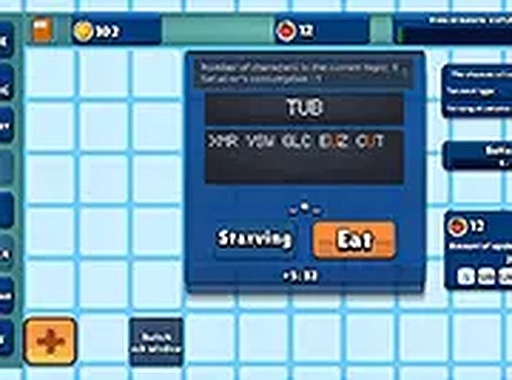
At its heart, this game revolves around a simple yet engaging cycle. You start each session by clicking on interactive elements, such as a tree, to gather food for your monkey. This resource is essential for keeping the monkey active and improving its typing ability. As the monkey types out random letters, you are presented with word choices. Selecting the correct ones helps steer its output toward recognizable literary passages. The feedback is immediate, with each correct choice visibly advancing the text toward completion.
Visual Style & Atmosphere
The game presents a charming, cartoon-like environment that feels welcoming and stress-free. Bright colors and simple animations keep the screen uncluttered, allowing you to focus on the typing and resource management. The monkey itself has expressive reactions that make the experience feel more personal. This visual approach supports the relaxed pacing, making it suitable for players who prefer a low-pressure activity.
Idle Progression Mechanics
A key feature is the idle progression system. Even when you step away, the monkey continues to type, slowly accumulating progress. This means you can check in periodically to collect food and make strategic word selections, then leave again. The game does not require constant attention, which fits well into short breaks or longer sessions. Over time, consistent feeding and correct choices lead to noticeable improvements in the monkey's output quality.
Resource Management & Strategy
While the core loop is simple, there is a layer of resource management that adds depth. Food is not unlimited; you must decide when to gather it and how to allocate it. Feeding the monkey more frequently can speed up its learning, but neglecting resource collection slows progress. Balancing these actions becomes the main strategic element. The game rewards players who plan their visits and prioritize which words to select for maximum efficiency.
Accessibility & Platform
Designed for desktop browsers, the game works best with a mouse and keyboard. The full-screen option helps minimize distractions, especially during longer play sessions. No downloads or installations are needed, making it easy to start playing instantly. The controls are straightforward, with clear on-screen prompts guiding each action. This accessibility ensures that players of all ages and skill levels can enjoy the experience without a steep learning curve.









Comments
0 comments